Connecting to SCP:SL Servers
SCP: Secret Laboratory servers are a lobby waiting for enough players to connect or for an admin to start the game. There are two ways to connect to a server, Direct Connection and the Public Server List. Direct Connection is available by default with no additional configuration, but the server list requires manual verification by the game's developers.
Direct Connect
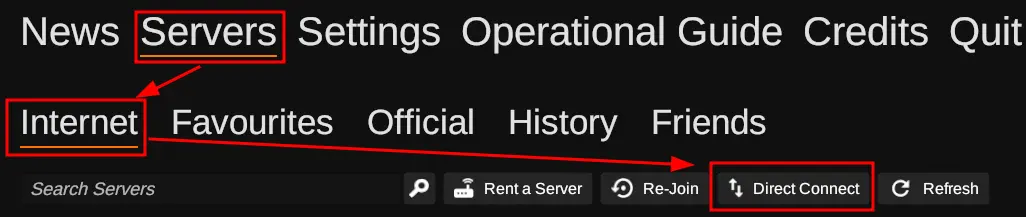
If your server isn't verified and/or is private you'll need to use the "Direct Connect" option under the "Servers" -> "Internet" tab. Clicking on the "Direct Connect" option, you'll be presented with a modal similar to the one shown below with a field for the IP and Port of your server.
SCP: Secret Laboratory uses the primary allocation for your server, so you can locate your server's IP under the name of your server on the server list or when viewing the server's page, as shown here.
 Loading...
 Loading...
Public Server List
SCP: Secret Laboratory has a public server list that can be accessed from in game from the main menu, but getting your server onto the list is a manual process.
If your server complies with the Verified Server Rules, is configured the way you want, and want to make your server public, you'll need to start by adding your contact email to the config_gameplay.txt in the /.config/SCP Secret Laboratory/<port>/config folder using the contact_email property.
After changing the contact_email property to your email, you need to restart the server, and then send an email to server.verification@scpslgame.com from the email you used with the following information.
Before sending the verification email, be aware of the following!
- You must comply with the Verified Server Rules
- Your server will be public!
- You must keep your server online until your server is verified!
- You must send the email from the address you set as your contact email.
Verification isn't needed for most server owners, and Direct Connection should be sufficient. It can take awhile to verify your server and you must maintain compliance with the Verified Server Rules.