Connecting your Domain
Setting up your domain will allow you to change your IP address to a custom domain you own, for example, mc.example.com or play.example.com.
First, you need to go to your domain's DNS provider. We will use Cloudflare for that.
WinterNode offers a free subdomain (example.playwn.co ) for you to use! You can learn more about how to set it up in our article about the Sub-domain Manager
A Record
We first need to create the A Record.
Press Add Record and set the following credentials:
- Type:
A - Name: Set this to the subdomain you want to use (
play,mc). If you are using Shared IP (if it requires a port) then set the subdomain to something else because we will need to use it in SRV Record. - IPv4 address: Set this to you IP Address without the port.
- TTL:
Auto - Proxy status (if available):
DNS Only
Your A Record should look something like this:
 Loading...
If you have a Dedicated IP, you should be all set and able to connect to your domain using the subdomain you provided as the name of the A Record (in our example, play.example.com).
SRV Record
The next step is to create a SRV Record to be able to set up the port, this is not required if you have a Dedicated IP.
It appears Namecheap's SRV Record system does not allow the ability to specify your own host.
Therefore a SRV record for mc.example.com won't work, but will work fine under example.com. The only workaround for this would be to change DNS Provider. We recommend Cloudflare.
Press Add Record and set the following credentials:
- Name: Put the name of the subdomain you want to use into this string
_minecraft._tcp.<domain>where<domain>is the subdomain you want to use. If you want to be able to connect toplay.example.com, use_minecraft._tcp.play, if you want to connect toexample.com(your root domain), use_minecraft._tcp.@. - Priority:
0 - Weight:
0 - TTL:
Auto - Port: Set this to your IP Address's port.
- Target: Set this to the subdomain you set in A Record earlier (in our example, we've set it to
play, the domain isexample.com. So we will useplay.example.com).
Your SRV Record should look something like this:
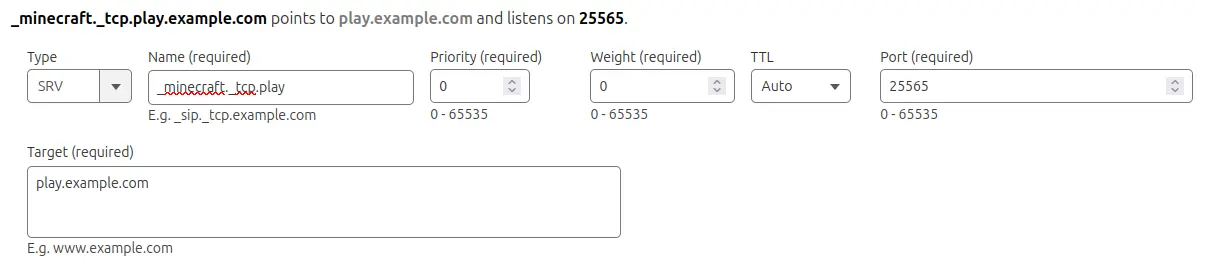 Loading...
After that, you are all set! You should be able to connect to your server using the subdomain you set in the SRV Record and your domain (in our example,
Loading...
After that, you are all set! You should be able to connect to your server using the subdomain you set in the SRV Record and your domain (in our example, play.example.com).